AI Agent vs Chatbot: What’s the Difference and Which Do You Need?
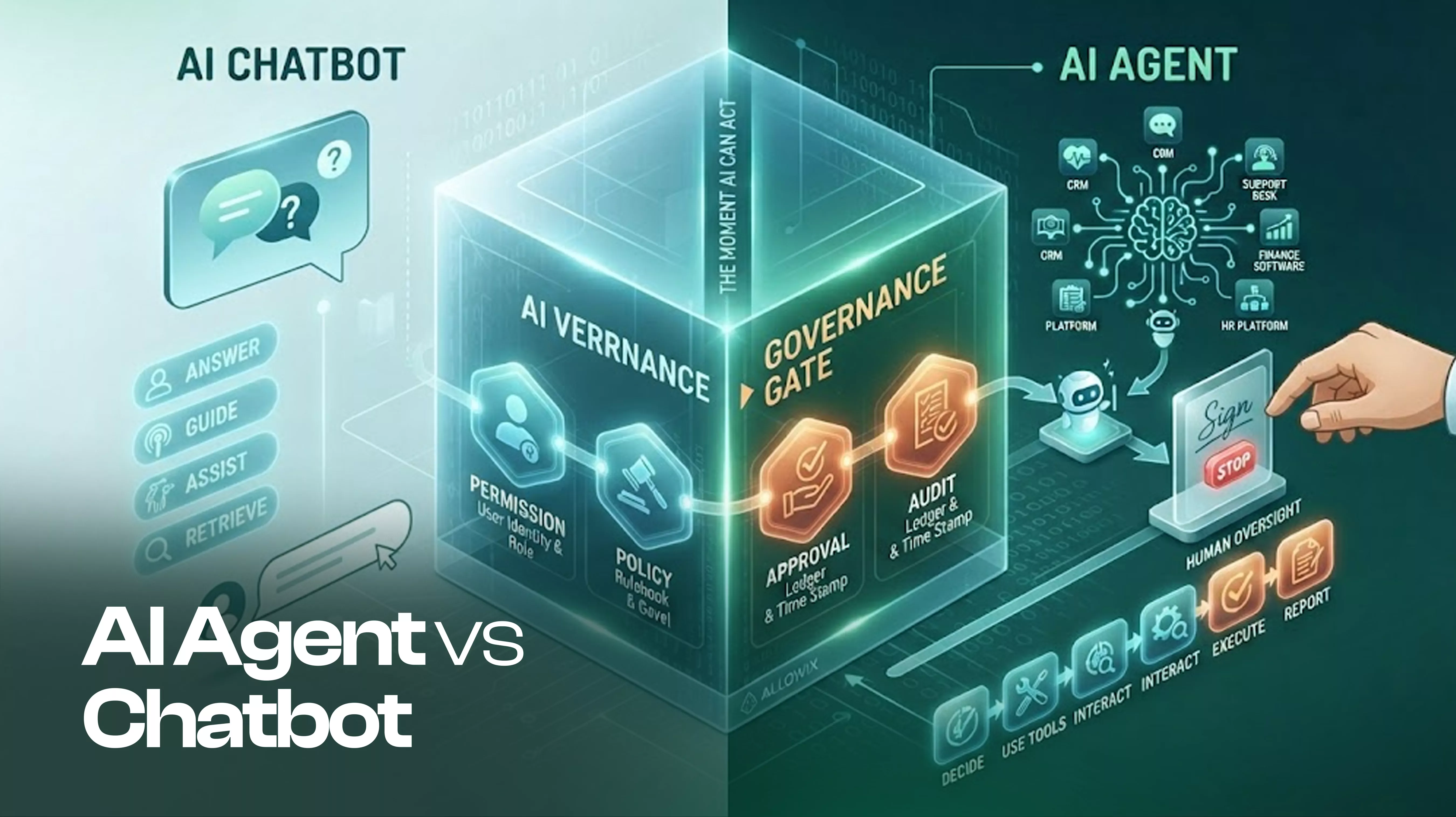
AI agent vs chatbot is not just a naming question. The real difference is what happens after the conversation.
A chatbot can answer a question, explain something, recommend a next step, or help someone find information.
An AI agent can go further. It can use tools, interact with other systems, make decisions within defined boundaries, and take actions to complete a task.
That changes the conversation completely.
A chatbot might tell a support manager that a customer is waiting.
An AI agent could find the customer, check the relevant information, prepare the next action, and update the right system.
The moment AI can act, permissions, access, approval, and accountability become part of the conversation.
So when someone asks: “What is the difference between an AI agent and a chatbot?”
The useful answer is not simply that one is smarter.
The useful answer is:
A chatbot primarily helps you interact. An AI agent can help you get something done.
Contents
- Key takeaways
- AI agent vs chatbot: the simple difference
- What is an AI chatbot?
- What is an AI agent?
- Side-by-side comparison
- What changes when an AI agent can act
- A risk difference
- How do AI agents work?
- AI agent use cases
- When should you use a chatbot instead?
- AI agents need more than a prompt
- Where does Allowix fit?
- What should you choose?
- Frequently Asked Questions
- Conclusion
Key takeaways
- An AI chatbot is primarily designed to communicate, answer, guide, or assist.
- An AI agent can use tools and take actions to complete a goal.
- The important difference is not how intelligent the model sounds. It is whether the system can actually act.
- Connecting an AI agent to business software introduces new questions around permissions, access control, approvals, and audit trails.
- AI automation becomes much more powerful when agents can work inside the systems a business already uses.
- Not every business problem needs an AI agent. Sometimes a chatbot is exactly what you need.
- Allowix focuses on the layer where an AI agent needs to act inside existing business software while remaining governed by permissions and policies.
AI agent vs chatbot: the simple difference
Here is the simplest way to think about it:
A chatbot responds.
An AI agent works toward an outcome.
A chatbot might answer: “What orders are waiting for shipment?”
An AI agent could:
- Find the orders.
- Check their status.
- Identify what is blocking them.
- Use an approved tool to take the next step.
- Ask for human approval if the action requires it.
- Report what happened.
That does not mean every AI agent is completely autonomous.
In fact, useful AI agent governance often means putting clear boundaries around what an agent can and cannot do.
The important distinction is that the agent has a path to action.
What is an AI chatbot?
An AI chatbot is a conversational system that uses AI to understand questions and generate responses.
You might use one to:
- Answer customer questions
- Explain a product
- Search a knowledge base
- Draft content
- Help employees find information
- Provide basic customer support
- Guide users through a process
For many use cases, that is enough.
If your goal is simply to help someone find information or have a conversation, you may not need an AI agent at all.
A good chatbot can already save time without being given permission to change anything.
What is an AI agent?
An AI agent is designed to pursue a goal by deciding what steps are needed and using available tools or systems to complete them.
For example, imagine an employee asks: “Find the customer’s latest issue and prepare the next step.”
A chatbot may explain how the employee can do it.
An AI agent could access the approved support system, find the relevant information, determine the next step, and perform an authorized action.
This is where AI agents for business become interesting.
The agent is no longer just another interface for asking questions.
It becomes part of the workflow.
AI agent vs chatbot: side-by-side
| AI Chatbot | AI Agent | |
|---|---|---|
| Primary purpose | Answer and assist | Complete a goal or task |
| Interaction | Conversation | Conversation + action |
| Information | Usually retrieves or explains | Can retrieve and use information |
| Tools | May have limited tool access | Can use connected tools |
| Business systems | Usually limited interaction | Can interact with approved systems |
| Actions | Mostly suggestions or responses | Can execute approved actions |
| Human involvement | User usually drives the next step | Agent can determine the next step |
| Risk | Incorrect information | Incorrect information + incorrect action |
| Governance | Mainly content and access | Permissions, policy, approval and audit |
| Best for | Questions and guidance | Workflows and task execution |
The table reveals something important.
The difference is not simply: old AI vs new AI.
It is: answering vs acting.
What changes when an AI agent can act?
This is where businesses need to slow down for a moment.
Giving an AI agent access to a tool changes its responsibilities.
Imagine the agent has access to a CRM.
Before tool access, the agent might say: “You should update the customer's status.”
After tool access, it could potentially update the status itself.
That creates three new questions.
1. What can the agent access?
Which systems? Which records? Which tools? Which information?
2. What can the agent change?
Can it create? Can it edit? Can it delete? Can it send? Can it approve?
3. Who can stop it?
If the agent is about to perform an important action, can a person intervene before the change happens?
This is where AI agent permissions and AI agent governance become important.
AI agent vs chatbot is also a risk difference
A chatbot can give you a bad answer.
You can close the conversation and try again.
An AI agent can potentially create a real-world consequence.
For example:
A chatbot gives the wrong customer information. That is a problem.
An AI agent sends the wrong customer information to someone outside the company. That is a different problem.
An agent changes the wrong record. Deletes something important. Sends the wrong email. Triggers the wrong workflow. Approves something it should not.
The model did not suddenly become evil.
The system simply gave the model a path to action.
That is why AI agent security is not only about securing the model. It is also about controlling what the agent can access and what it can do. See also: who is responsible when AI makes a mistake.
How do AI agents work?
A simple AI agent workflow looks like this:
Understand → Decide → Use a tool → Observe → Continue
For example, a user asks: “Find the unresolved customer issue and move it to the right team.”
The agent might:
- Understand — Interpret the request.
- Decide — Determine which information and tools are needed.
- Use a tool — Search the support system.
- Observe — Review the returned information.
- Act — Move the ticket if the action is permitted.
- Report — Tell the user what happened.
This is why searches such as “how do AI agents work” are becoming more important as people move beyond the basic chatbot conversation.
AI agent use cases
You do not need an AI agent just because everyone is talking about them.
The better question is: where does your team repeatedly move information from one place to another or perform the same decision-driven task?
That is where AI agent use cases start to appear.
Customer support
An agent can find customer context, identify relevant information, prepare a response, and update approved records.
Sales
An agent can research account information, prepare follow-ups, update CRM records, and coordinate next steps.
Operations
An agent can monitor workflows, identify exceptions, retrieve information, and trigger approved actions.
HR
An agent can help employees find information, guide requests, and work with approved HR workflows.
Finance
An agent can retrieve information and prepare actions while keeping sensitive transactions behind appropriate controls.
These are not reasons to remove people from the workflow.
They are opportunities to remove repetitive steps that keep people away from higher-value work.
When should you use a chatbot instead?
Sometimes the answer is simple.
Use a chatbot when the main problem is: “People need answers.”
For example:
- Product FAQs
- Knowledge search
- Customer questions
- Internal information
- Basic guidance
- Content assistance
You may need an AI agent when the problem becomes: “People need the work done.”
For example:
- Update a record
- Create a ticket
- Schedule something
- Move information between systems
- Trigger a workflow
- Prepare and execute an approved action
The important thing is not to turn every chatbot into an agent.
Give the system only the authority the job actually requires.
AI agents need more than a prompt
This is one of the biggest differences between experimenting with AI and putting an AI agent into a real business workflow.
A prompt can tell an AI what you want.
It does not automatically define what the AI is allowed to do.
Once an agent can interact with business software, you need a clearer model for:
- Identity — Who is the agent acting for? See how to give an AI agent an identity.
- Permissions — What is it allowed to access?
- Policy — Which actions are permitted?
- Approval — Which actions require a human decision? See human in the loop AI agents.
- Audit — Can you understand what happened afterward? See AI agent audit trail.
That is the foundation of AI agent governance.
Where does Allowix fit?
Allowix is not positioned as another chatbot.
It is designed as a governed AI layer that can be embedded into the business software teams already use.
The distinction matters.
Your existing application remains the place where the work happens.
Allowix provides the layer through which AI agents can understand context, use approved tools, and take controlled actions.
For example, an agent may be allowed to read information automatically while a higher-risk write requires explicit human approval.
The governance gate checks:
Permission → Policy → Approval → Audit
If the requirements are not satisfied, the action does not proceed.
Allowix currently uses OpenAI models and is architected to support additional models over time. Its interaction layer uses 12 defined card types to keep AI responses predictable across the application.
The point is not to make every workflow autonomous.
The point is to make AI useful without giving it unlimited authority.
AI agent vs chatbot: what should you choose?
Ask one question:
Does your user mainly need an answer or an action?
If they need an answer: start with a chatbot.
If they need the system to perform a task: consider an AI agent.
If the agent needs access to important business systems: now you need governance.
That last step is where many AI projects become more complicated than the original demo suggests.
The technology can show that an agent can perform an action.
Your business still needs to decide whether it should.
Frequently Asked Questions
Is an AI agent the same as a chatbot?
No. A chatbot primarily communicates with users. An AI agent can use tools and take actions toward completing a goal. Some modern chatbots include tools and agent-like capabilities, so the boundary can overlap. The practical test is whether the system can actually perform actions rather than only provide responses.
What is the main difference between an AI agent and a chatbot?
The simplest distinction is action. A chatbot answers or assists. An AI agent can take steps toward completing a task using connected tools.
Can a chatbot become an AI agent?
Yes. A conversational system can gain agent capabilities when it is connected to tools and given the ability to perform actions. That change should also trigger a review of permissions, access, policies, and human approval.
Are AI agents fully autonomous?
They can be designed with different levels of autonomy. An agent does not need unlimited autonomy to be useful. For business applications, controlled autonomy can often be more practical than allowing an agent to perform every possible action.
What are common AI agent use cases?
Common use cases include customer support, sales operations, employee workflows, research, scheduling, data retrieval, and business process automation. The best use case is usually a repetitive workflow where the agent has enough context and clearly defined authority to perform useful work.
Is an AI agent more secure than a chatbot?
Not automatically. An AI agent can have a larger risk surface because it may have access to tools and business systems. That makes AI agent security, permissions, access control, human approval, and auditability important parts of an agent deployment.
Do AI agents replace business software?
Usually, that is not the right way to think about them. An AI agent can operate through existing business software rather than replacing the systems that already hold the organization's records and workflows. See how to add AI agents to existing software.
Conclusion
The AI agent vs chatbot question becomes much easier when you stop comparing the interfaces.
Ask what the system can actually do.
A chatbot can help you understand.
An AI agent can help you act.
And the moment an AI agent can act inside your business software, the conversation changes from:
“Can AI do this?”
to:
“What should AI be allowed to do?”
That is the question worth answering before connecting the first tool.
Because giving AI the ability to act is easy.
Giving it the right authority is the real work.
See governed agents in your own product.
Book a demo and we'll walk your team through the governance model, the two-seam integration, and a use case for your industry.